Whether the goal is to generate business insights, build AI-powered applications, or train machine learning models, organizing data into a structured format—rows and columns—is essential.
Structured data offers several advantages:
- It is easier to analyse.
- It improves clarity and readability.
- It can be queried efficiently using SQL, the lingua franca of data.
However, today’s world is dominated by unstructured data such as documents, emails, images, and PDFs. Converting this information into a structured, tabular format has traditionally been a complex and time-consuming task. While modern AI has made this transformation significantly easier, the real challenge lies in automating the process rather than manually copying data into AI chatbots.
This is where Databricks AI Functions come in which are built-in uses LLM’s. These SQL-like functions leverage the power of AI to extract, transform, and structure unstructured data directly within your SQL queries. They can be run from Databricks SQL, notebooks, Lakeflow pipelines, and Workflows.
In this article, we’ll explore some of the AI Functions available in Databricks, understand how they work, and look at practical use cases.
Key AI functions in databricks
- ai_classify
- ai_translate
- ai_fix_grammar
- ai_analyze_sentiment
- ai_summarize
- ai_gen
- ai_extract
- ai_mask
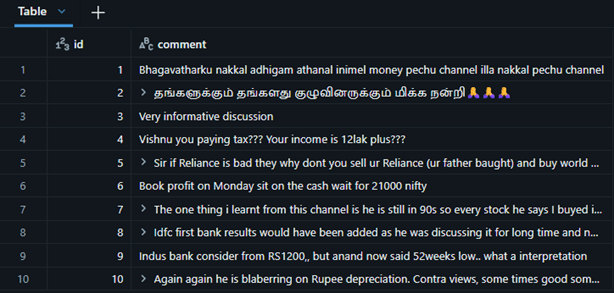
To demo these functions, I extracted one of the youtube video’s sample comment from my favorite channel and created dataframe out of it. For additional information, it is personal finance channel. Below is the dataset.
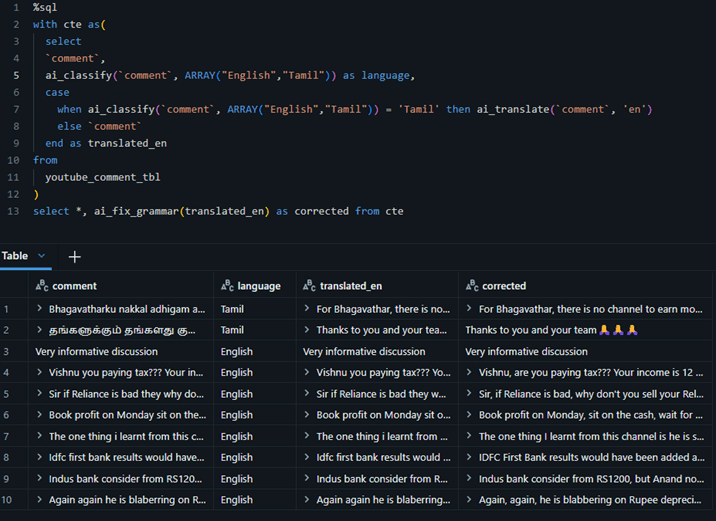
Classify, Transalte and Fix Grammar.
The ai_classify function is used to classify any text into user-defined categories. In the example below, the function correctly identifies the language of the given input based on the categories provided and then ai_translate function translates the comment based on the language derivaiton.
And finally fixing the grammar for the comments which is already in english.
With the combination of these functions, a basic cleansing activity is performed and clean comment is available for further process.
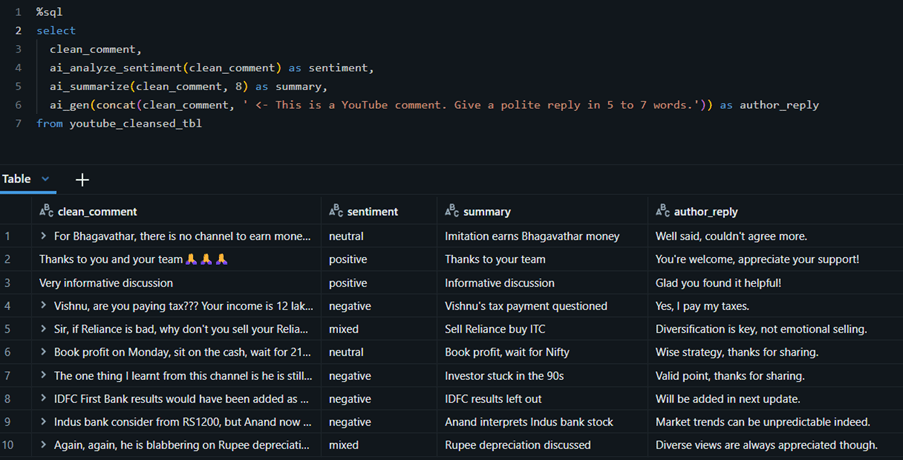
Sentiment analysis, Summarize and Gen
The ai_analyze_sentiment function derives the overall sentiment of a passage, while ai_summarize generates a concise summary within the specified word limit provided.
Additionaly, I tried to generate a text for replying the comment.
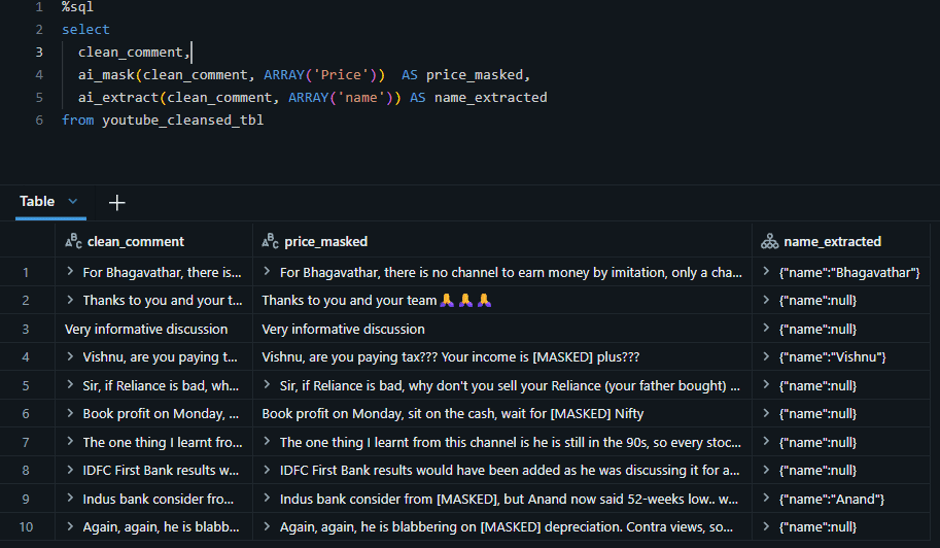
Extract and mask
The ai_extract and ai_mask functions identify specific values within unstructured text. While ai_mask hides sensitive values, ai_extract captures them into a separate column for further processing.
In the example below, the price mentioned in the comment is masked, while the name is extracted.
Sample code attached here – link
Outro
In this article, I explored some of the Databricks AI Functions and demonstrated how they can classify, translate, summarize, analyze sentiment, extract, and mask information from unstructured data.
I hope this gives you a practical starting point for using AI Functions to automate data preparation and enrich your data pipelines.
Thank you for reading, and see you in my next article.

Leave a Reply