While data has become a valuable asset for every organization and plays a key role in the decision-making process, the value of analytical workloads has increased significantly as well.
However, many organizations still have legacy data that has not yet been migrated and continues to reside in relational databases such as SQL Server. Bringing this legacy data together with modern data sources and performing analytics across them can provide significant business value. The obvious approach would be to build ETL pipelines to extract, transform, and load the data into a centralized platform.
Databricks offers an alternative approach called Lakehouse Federation, which enables organizations to connect external systems directly to Unity Catalog without physically moving or copying the data.
As a result, organizations can unlock analytical value from legacy and external data sources.
Lakehouse house federation Key points
- It is query federation platform
- There are two types of federation provided by databricks catalog federation and query federation. Catalog federation is reading a dataset from external applications like AWS glue, Hive metastore using databricks compute.
- Where as query federation, access data from relational databases.
- Governed and read-only with unity catalog through foreign catalogs
- Runs query against external system using jdbc connection internally
- Performs push down (with some limitations)
- Fine grained access at table level
Power of Lakehouse federation
If you’ve ever needed to pull together data scattered across a Delta table, a SQL Server instance, and a PostgreSQL database, you know the usual drill: export from each, land it somewhere central, then finally start your analysis. Databricks Lakehouse Federation is designed to skip that dance entirely — and it handles exactly this kind of multi-system scenario well.
Let’s demo!
Setup needed for the demo
- Spin up databricks (unity catalog enabled)
- Spin up SQL server
- Spin up Postgres SQL server
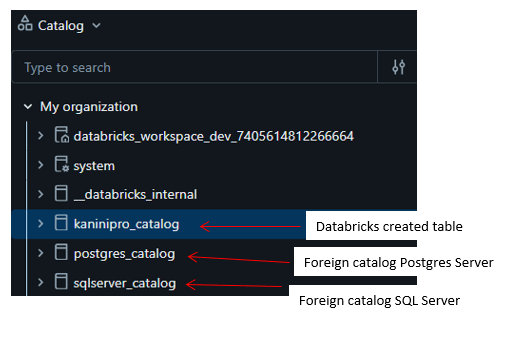
- Create Databricks connection and foreign catalog for SQL server
- Create Databricks connection and foreign catalog for postgres server
- Prepare Sample dataset in SQL and postgres Server along with databricks delta-table UC managed.
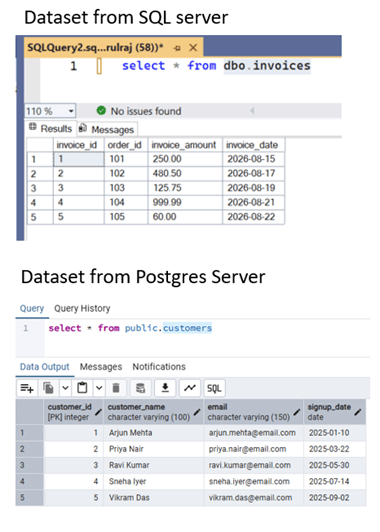
Databricks delta table
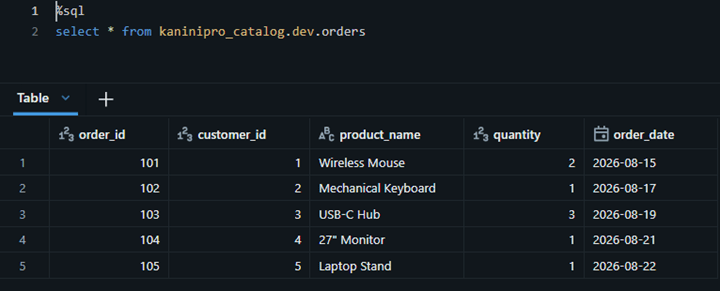
What else! Then start querying the table.
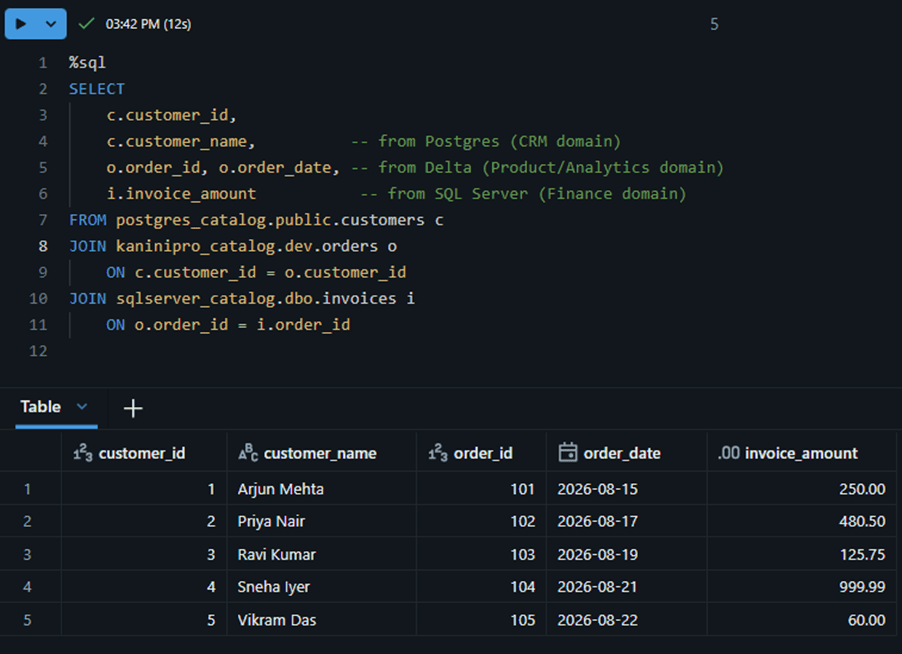
Able to analyse the data from different systems without moving the data.
Limitations of lakehouse federation
- Every query against a foreign Catalog hit live SQL server which probably a live production OLTP bring downs the performance of production application.
- Federation queries are limited by source engine speed and don’t use any databricks performance features like photon, z-ordering, liquid clustering
- Federation queries don’t have time travel capability
References
https://www.databricks.com/blog/introducing-lakehouse-federation-capabilities-unity-catalog
https://learn.microsoft.com/en-us/azure/databricks/query-federation
Happy learning !!

Leave a Reply