In any data platform, functions play a major role in keeping code modular, reusable, and clean. The Databricks ecosystem also provides functions, it is important to design functions correctly without compromising Spark’s capabilities.
Like other systems, Databricks offers a rich set of built-in functions. However, this blog focuses on User-Defined Functions (UDFs) and explores them in greater detail.
User-Defined Functions (UDFs) can either be defined directly within your code or registered in Unity Catalog for centralized management and reuse. They can be implemented using PySpark, Scala, or SQL.
Let’s explore each of these options and understand their use cases, advantages, and limitations.
- Python UDF
- Pandas UDF
- Native Pyspark (or scala spark)
- Unity Catalog SQL Function
- Unity Catalog Python Function
I attached the source code used for this demo – source_code.
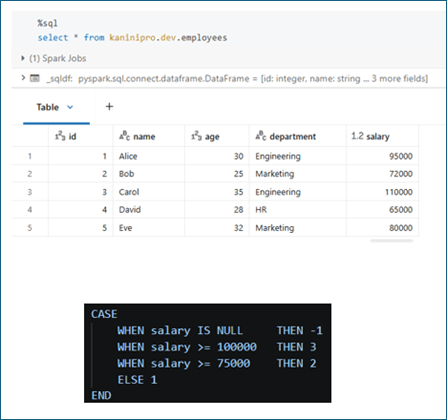
Sample dataset & Function Definition
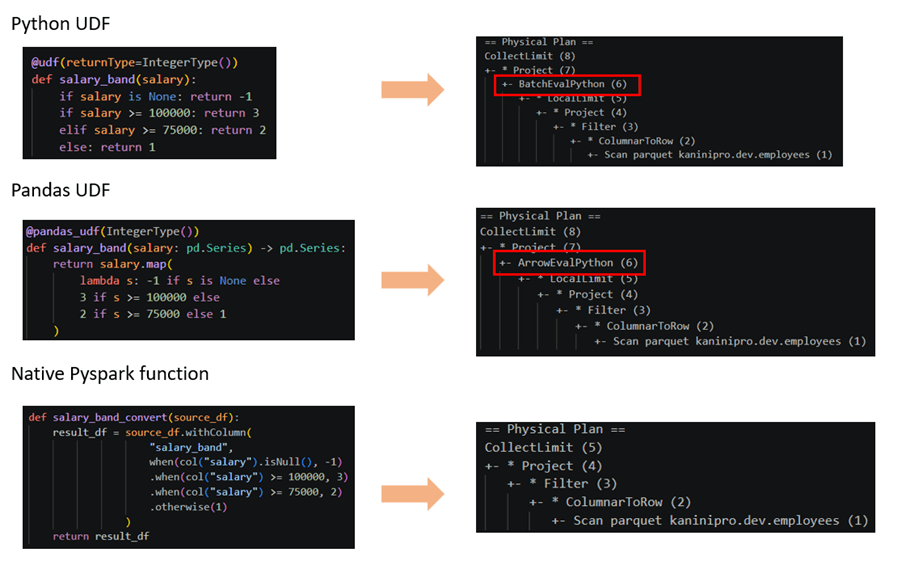
The same logic was implemented using a Python UDF, a Pandas UDF, and native PySpark functions. The Spark execution plan highlights the difference between these approaches.
For a Python UDF, the execution plan shows BatchEvalPython, while a Pandas UDF appears as ArrowEvalPython. In both cases, processing happens outside the JVM, introducing serialization and deserialization overhead.
With BatchEvalPython, rows are transferred between the JVM and Python in small batches. ArrowEvalPython uses Apache Arrow for columnar data transfer, reducing overhead and improving performance compared to standard Python UDFs.
However, both approaches are generally slower than native PySpark functions because native functions execute entirely within Spark’s JVM engine, allowing Spark’s optimizer to generate more efficient execution plans and fully leverage distributed processing.
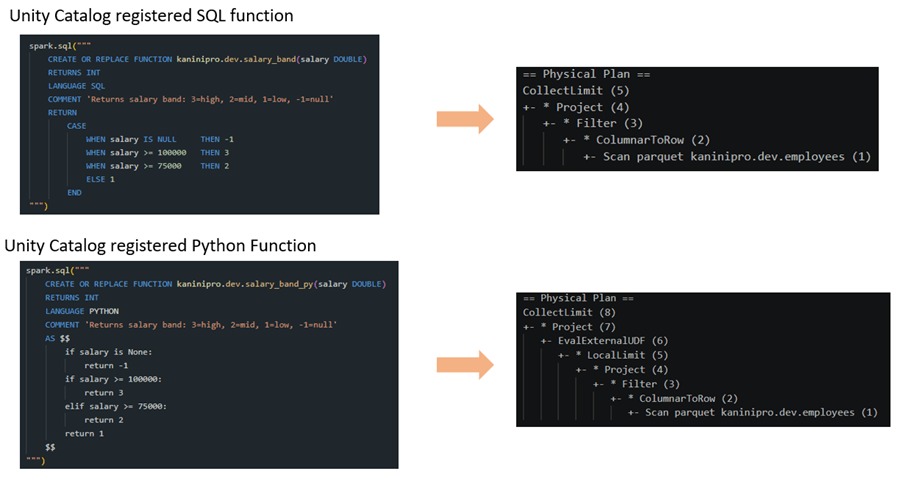
Additionally, functions can be registered in Unity Catalog using different languages, enabling them to be shared and reused beyond a single session. This allows teams to centralize business logic and use it across multiple repositories, projects, and workloads instead of duplicating the logic in application code.
Below is a comparison between Unity Catalog functions implemented in SQL and Python. The execution plan shows that the Python-based Unity Catalog function still uses EvalExternalUDF, which executes outside the JVM. As a result, serialization and deserialization between Spark and the external runtime are still required.
In contrast, SQL-based Unity Catalog functions remain within Spark’s native execution engine, allowing Spark to optimize the execution plan more effectively. Therefore, when possible, SQL functions are generally preferred for better performance, while Python functions should be reserved for logic that cannot be expressed using native Spark SQL capabilities.
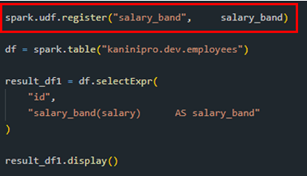
Note: When invoking Python UDFs or Pandas UDFs through the Spark SQL API, the functions must first be registered as UDFs before they can be referenced in SQL queries.
Conclusion
- Prefer native PySpark functions for processing large volumes of data. They provide the best performance and are the preferred choice when the logic can be maintained within the codebase.
- If the same business logic needs to be reused across multiple projects, repositories, or teams, consider registering it as a Unity Catalog function to enable centralized governance and reuse.
- SQL functions and native PySpark functions are generally more efficient than Python UDFs and Pandas UDFs because they remain within Spark’s optimized execution engine and avoid the overhead of external execution, serialization, and deserialization.
References

Leave a comment