As organizations continue to adopt modern data platforms, the need for reliable, scalable, and maintainable data transformation processes has become increasingly important. While Lakehouse platforms excel at storing and processing large volumes of data, transformation logic is often developed and maintained entirely by data engineers.
In many organizations, even a small reporting or business-rule change requested by a data analyst must go through a data engineer. As teams grow, adding more people into this process can reduce efficiency and slow down the delivery of simple transformation changes.
DBT (data build tool) helps address this challenge. It allows data engineers to retain control of the processing infrastructure while enabling SQL-proficient data analysts to build and maintain transformation logic themselves, doesn’t mean eliminate the data engineers DE and DA will collaborate efficiently.
In essence, DBT acts as a transformation layer that manages SQL-based data models while leveraging the power of modern data platforms such as Databricks, Snowflake, Google BigQuery, and Amazon Redshift.
In this article, we will explore the fundamentals of DBT and how to get started with DBT on Databricks.
Key points about DBT
- DBT is neither a processing engine nor a database; it is a tool used to manage SQL transformations.
- DBT core and DBT cloud
- core is open source
- cloud is managed saas platform built on top of DBT-core. It is owned by the company called DBT labs founded by Tristan Handy and Drew Bandera in Philadelphia.
- what is model — A model is an SQL query saved in a .sql file
- The model’s code is not solely SQL; it combines SQL and Jinja.
- source() and ref() are two core Jinja functions in DBT used to reference data.
- ref() – Used to reference other models within your DBT project
- source() – Used to reference raw tables that land in your warehouse
- DBT doesn’t know your data (except some metadata), all runs in the warehouse environment only.
- dbt does NOT auto-delete tables when you remove a model file. You must clean them up manually.
Advantages of having DBT
- Modular SQL models
- DBT automatically resolves the execution order of your models based on relations
- Since DBT model is a code, it compatible with git version control. So, it has features like CI/CD, track changs, same code across environments like other software deployments.
- It naturally aligns with the data mesh concept.
- The data transformation must serve the organization’s data modelling. There is a thought process that dbt models is doing data modelling.
- Declarative tests like not null, unique, accepted values.
Note: There are many other advantages to using dbt. I’m sharing only the ones I have personally experienced. Feel free to add your own insights and experiences in the comments.
A typical folder structure of DBT project.
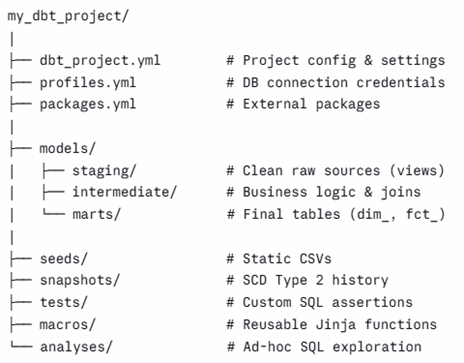
Let’s try it out dbt setup with databricks. I attached the source code here – link
Prerequisite
- Databricks infra setup
- Setup dbt repository with project init (I added this in readme.md)
- Setup databricks token in environment variable in the name of “DBT_TOKEN” and cluster details in profiles.yml
Connection details configured in profiles and used interactive cluster for the load which can be changed.
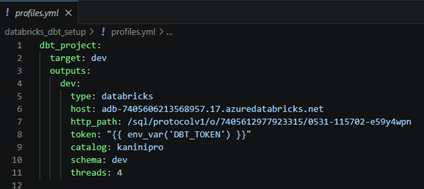
Execute the dbt in local where the repository cloned using “dbt run”.
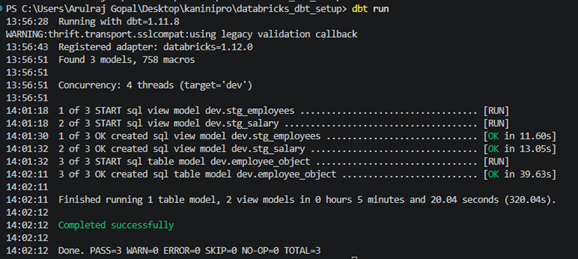
The raw table processed and output tables and views are created.
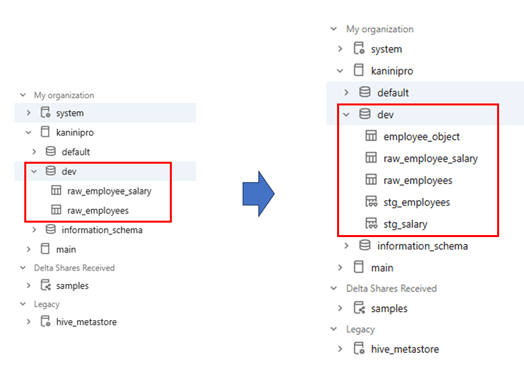
And an interesting observation is that dbt models can be viewed as data models, which makes the code and transformation logic more intuitive and easier to understand from a data modeling perspective.
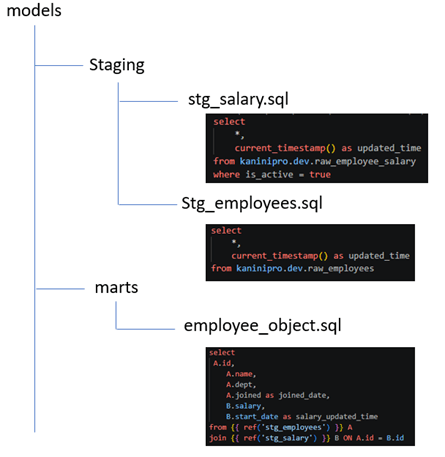
The demo demonstrated a successful connection setup and a working prototype where DBT executes transformations on Databricks. This serves as a foundation for exploring more advanced DBT features and production-ready data workflows.

Leave a comment