Ravi pushes his half-finished payment feature straight into main. Now the app crashes for everyone who pulls the latest code.
Priya has been working on her own branch for 2 months without merging. When she finally tries, her code conflicts with hundreds of changes others made, and it takes her a whole week just to fix the conflicts.
A customer reports a serious bug in the live app. The team wants to fix it immediately, but main is full of unfinished features, so they can’t release anything without also releasing broken work.
Everyone on the team may be skilled, but without proper coordination and clearly defined rules, even the best teams can turn development into chaos.
The solution? Establish a set of rules for how everyone works with Git. That’s exactly what a well-defined Git branching strategy brings to the table.
What is git branching strategy?
A git branching strategy is simply a team’s agreed set of rules for how to use branches in Git: when to create them, what to name them, and how and when to merge them back.
My previous articles covered Git fundamentals, including branches, merging, and handling merge conflicts, so I won’t revisit those basics here.
Instead, I’ll focus on how following a disciplined Git workflow and having a well-defined branching strategy can make collaboration easier, prevent unnecessary conflicts, and keep the development process smooth and organized.
If you look up Git branching strategies online, you’ll come across several names. Here are five commonly used approaches:
- Feature Branching
- Git Flow
- GitHub Flow
- Trunk-Based Development
- Release Branching
Although these strategies go by different names and follow different workflows, they can largely be understood through two fundamental aspects that define their trade-offs: isolation and integration speed.
These two factors determine how developers work independently, how frequently their changes are integrated, and ultimately, how smoothly the team can deliver software.
For this discussion, let’s focus on two branching strategies that represent different trade-offs: Git Flow and Trunk-Based Development.
Why these two?
Git Flow builds on the concept of release branching, while GitHub Flow follows a much simpler approach that is closely aligned with trunk-based development. By comparing these two, we can understand the fundamental differences in isolation, integration speed, and release management without getting into every variation of branching strategy.
Let’s illustrate how these branching strategies work in a real-world project.
Along with the Git branching strategy, I’ll also map each branch to its corresponding deployment environment to make the workflow easier to understand.
For this walkthrough, let’s assume a project with four environments:
- DEV – Development and initial testing
- SIT – System Integration Testing
- UAT – User Acceptance Testing
- PROD – Production
We’ll see how Git Flow and Trunk-Based Development handle code movement across these environments, how changes are promoted, and how releases are managed in each approach.
Git flow
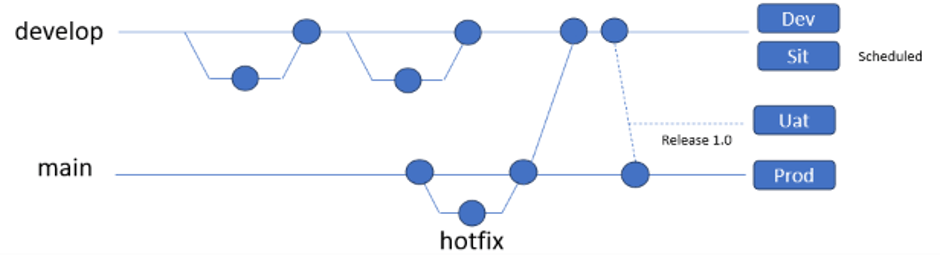
Git flow keeps two permanent branches. main only holds released versions, and develop is where work comes together.
- Features branch off develop and can live for days or weeks. When it’s time to ship, a release branch is cut for stabilization, then merged into main.
- Urgent fixes go on a hotfix branch off main and they merged back to main & dev and if any release branch is opened that point of time, then merge it to release also.
Environment mapping — Both Dev and SIT environments are deployed from the Dev branch. Every code change is deployed to Dev, while deployments to SIT happen periodically to avoid frequent releases that could disrupt ongoing testing.
Once SIT sign-off is received, the changes are merged into a Release branch. Each release is versioned (e.g., 1.0, 2.0) and deployed to UAT. Following UAT sign-off and production approval, the release is merged into the Main branch and deployed to Production.
For hotfixes, changes are deployed to Production first to address critical issues, and the same changes are propagated to lower environments later.
Trunk based
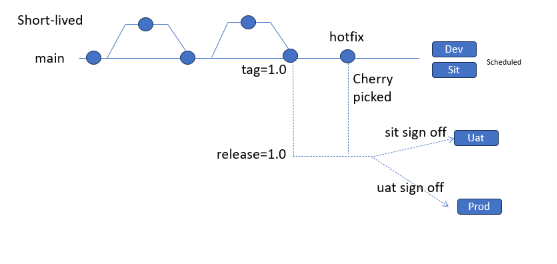
Trunk-based development keeps a single long-lived branch, main (the “trunk”), and everyone integrates into it at least once a day. There is no develop branch. main must always be in a releasable state.
- Developers either commit straight to main or use short-lived feature branches that last hours, or a day or two at most. Each change is small, passes automated tests in a pull request, and is merged back quickly. Unfinished work is hidden behind feature flags instead of being kept on a branch.
- Release branch off from main. No changes made in the release branch.
Environment mapping – Every merge to main triggers the CI and automatically deployed to dev and once validation passed the build promotes to SIT either automatically or schedule.
Once sit sign-off the build gets tagged version (e.g.1.0) and promoted to UAT. After UAT sign-off the same tagged build deployed to prod.
For hotfixes, the fix is committed to main first, so it can’t be lost in a later release. It’s then cherry-picked onto the release branch or the current production tag and fast-tracked to Production. Lower environments pick it up automatically, because they’re already built from main.
Key differences
- Git flow: Branches are merged back only occasionally, so work stays more isolated and production isn’t affected. But merging takes more effort, because long-lived branches are more likely to conflict.
- Trunk-based: Main is always deployable and close to production. Less isolation means faster integration, but unfinished changes can reach production, so it depends on strong automated testing and feature flags.
Trunk-based development: used by companies that deploy many times a day, such as Google, with around 35,000 developers in a single trunk, and Meta and Microsoft’s Office team, which practice it at scale.
Git flow: used by teams with scheduled releases, such as regular sprint deployment cycles with formal SIT/UAT sign-offs, and for versioned software like desktop apps, mobile apps that go through app-store review, libraries, and enterprise products.
Outro
There’s no one-size-fits-all branching strategy. Git flow suits teams with scheduled releases that need stable, isolated code, while trunk-based development fits teams with strong automation that want to ship fast and often. Whichever you choose, the real win is that everyone follows the same rules, so the Ravis and Priyas on your team never have to turn development into chaos again.

Leave a Reply