Spark driver program is a JVM process that runs spark application main program and coordinates the jobs, stages, and tasks.
Spark executor is a JVM process launched on worker nodes executes the tasks.
A job can contain multiple stages, and each stage can further contain multiple tasks. But how does Spark decide what qualifies as a job, and how are its elements—stages and tasks—determined?
Let’s deep dive into it.
As mentioned in the previous article, Spark operates lazily and executes only when an action (such as count, show, or write) is called.
This means that every action in the code triggers an execution, which we refer to as a job.
In simple terms, each job is triggered by an action.
Before looking into stages, it is essential to understand the types of transformations.
Transformations in Spark can be classified into narrow and wide.
- Narrow transformations create an output partition from a single input partition.
- Wide transformations create an output partition from multiple input partitions, which requires shuffling.
Shuffling is an expensive operation because the serialized data often needs to be transferred across the network between worker nodes.

Spark Stage – Each wide transformation introduces a new stage in the Spark execution plan.
If a job does not contain any wide transformations, then the Spark job will consist of only a single stage.
Coming to the task, which is the smallest unit of execution in Spark—tasks are the only components that interact directly with the hardware. Everything else (jobs and stages) exists for orchestration and logical grouping.
The number of tasks in Spark is determined by the number of partitions.
When a Spark object (DataFrame, RDD, or Dataset) is created, the data is divided into multiple Spark partitions.
By default, when Spark reads a file, it creates one partition for every 128 MiB of data (approximately 134.2 MB). After a shuffle operation (triggered by a wide transformation), the data is stored into a default of 200 partitions, which is configurable.
Another important point to note is that when writing a DataFrame into Parquet format, the number of output Parquet files will be equal to the number of Spark partitions in the DataFrame.
Controlling the number of partitions is key to managing Spark’s parallelism and efficiency. Spark also provides configurations for finer control over partitions and includes mechanisms like Adaptive Query Execution (AQE) to dynamically manage partitions. We will explore these mechanisms in detail in a separate article.
Demo
Sample Data in Azure Data Lake Storage
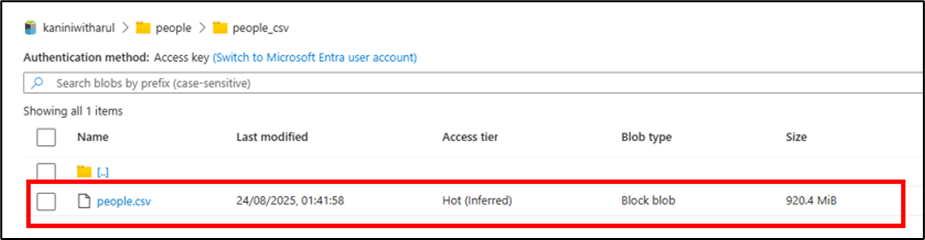
Below is a PySpark code example that reads the above file, performs some narrow transformations (such as deriving age and filtering records), and then performs a wide transformation (group by) before writing the result to a location.
Configuration change: – AQE disabled (for this demo, to understand the fundamentals) & number of shuffle partition changed to 10.
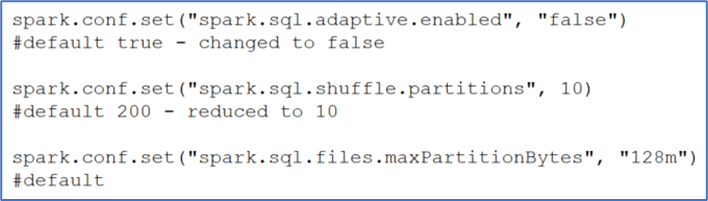

As discussed, let’s calculate how many jobs, stages, and tasks are involved in this execution:
- Since there is only one action (write), only one job will be triggered.
- The job includes one wide transformation, so the total number of stages is 1 + 1 = 2.
- The input file is 920 MiB, and with the default partition size of 128 MiB, Spark creates 7 full partitions and 1 smaller partition, resulting in a total of 8 tasks while reading the file.
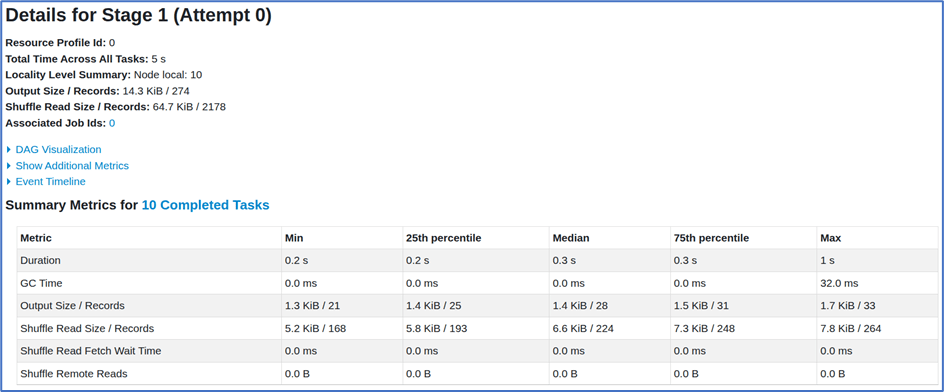
- After the groupBy operation, the data is shuffled into 10 partitions (as configured). Consequently, 10 tasks are created during the shuffle and the write phase.
Verifying with Spark UI
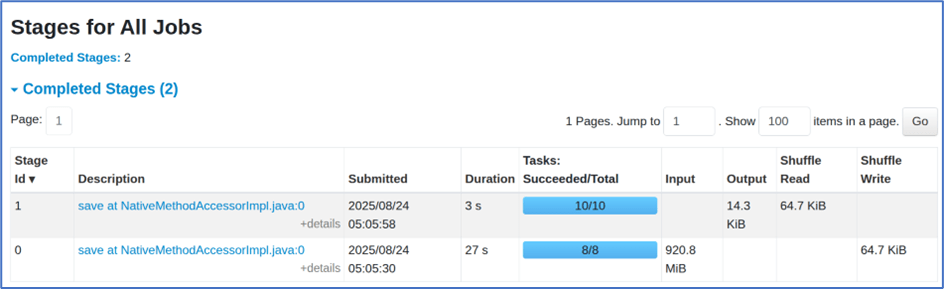
One job with 18 tasks.

Two stages were created:
- Stage 1: 8 tasks for reading the file.
- Stage 2: 10 tasks after the groupBy shuffle, which then wrote the data into the target location in Parquet format.
A summary of the stages is attached below.

Data Written into ADLS
- The output data was written into 10 Parquet files, as there were 10 partitions.
- In real-time scenarios, there may be cases where a partition does not contain any data. In such situations, no Parquet file will be created for that partition—the corresponding task will run with an empty partition and close quickly.

Additionally, we can get the number of partitions by doing below

Conclusion
Understanding how Spark jobs, stages, and tasks are orchestrated is crucial for writing efficient Spark applications.
- A job is triggered by an action such as count, show, or write.
- Jobs are divided into stages, with each wide transformation introducing a new stage.
- Stages are further divided into tasks, which are the smallest units of execution and run directly on executor cores.
- The number of tasks is determined by the number of partitions, making partition management an essential factor in Spark performance.
- By default, Spark creates one partition per 128 MiB of input data and uses 200 shuffle partitions after wide transformations, though both are configurable.
- Mechanisms like Adaptive Query Execution (AQE) and partition tuning play a significant role in achieving optimal parallelism and efficiency.
From the demo, we observed how Spark translates a simple action into jobs, stages, and tasks, and how partitions ultimately decide the level of parallelism and the number of output files.
In essence, gaining clarity on jobs, stages, and tasks helps Spark developers design better pipelines, optimize performance, and avoid common pitfalls such as underutilization of resources or excessive shuffling.
 KaniniPro
Leave a comment