Modern data teams prioritize fast insights with minimal operational overhead. When your data already lives in Azure Data Lake Storage (ADLS) as Delta tables, spinning up Spark just to do light processing often feels like overkill.
That’s where DuckDB shines.
In this article, we’ll walk through processing Delta tables stored in ADLS using DuckDB—focusing on minimal dependencies, fast iteration, and a low-cost setup for handling mid-sized data.
For this demo below is the setup I used and achieved:
- My laptop as client machine – 13th Gen Intel(R) Core(TM) i3-1315U (1.20 GHz) – 8GB RAM
- Environment manager as UV with python
- Pre-processed data in ADLS in delta-lake table format (assume this is already present)
- 100+ GB of data processed (actually completely aggregated) and written into parquet format. (duckdb not supports delta write yet)
Source code
https://github.com/ArulrajGopal/kaninipro/tree/main/adls_detla_duckdb
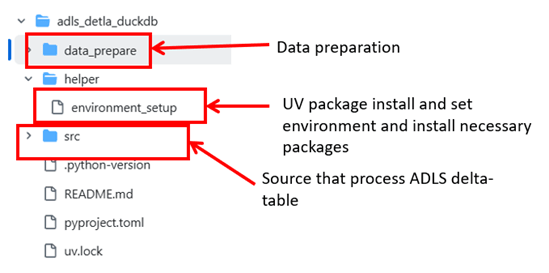
Implementation and processing
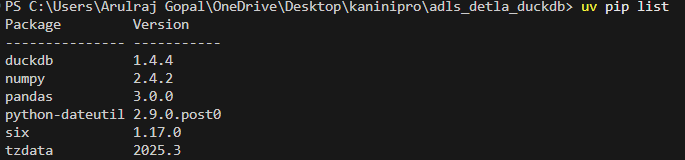
UV setup with necessary packages installed.
For data preparation, I used a Spark-installed virtual machine with 256 GB RAM, which generated ~100 GB of data in about 1.5 hours. The data preparation logic is included in the source code.
Below is the code used for data processing. It focuses on aggregation-heavy operations and requires an almost full scan of the dataset, making it highly relevant for evaluating data processing performance.
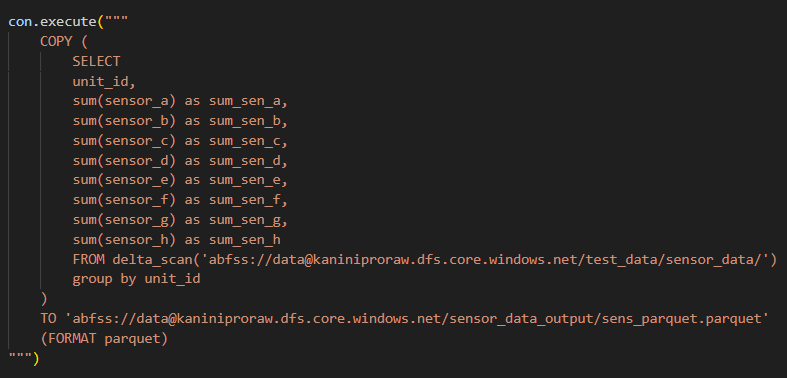
And the process completed in 34 minutes.

With this, it’s clear that DuckDB can handle mid-size data processing on a single machine. However, Delta table writes are not yet supported, and a few additional improvements are still needed. That said, the overall capability looks quite promising.
To run this process in the cloud, an Azure virtual machine with 32 GB RAM should be sufficient to complete it in under 10 minutes, with an estimated cost of around ₹10 (≈ $0.1).
References
https://blog.dataexpert.io/p/i-processed-1-tb-with-duckdb-in-30
 KaniniPro
Leave a comment