Before defining Lakeflow Spark Declarative Pipelines, let’s first understand the declarative approach, Spark declarative pipelines, and finally Lakeflow Spark declarative pipelines.
Procedural vs declarative
Any task in computer science that describes how the task should be performed is considered a procedural programming approach, whereas defining what needs to be achieved—leaving the remaining setup and execution details to the system—is known as the declarative approach. Both have their own pros and cons, and engineers should choose the approach that best fits their project requirements.
What is spark declarative pipelines?
The goal of any data pipeline is to extract data from various sources, formats, and speeds, and deliver it in the right format at the right time—in other words, ETL. When this is achieved in a declarative way using Spark APIs, it is called Spark Declarative Pipelines, which is open source and linked in the references section.
Lakeflow Spark Declarative pipelines (LSDP)?
- Lakeflow Spark Declarative Pipelines (SDP) is a framework for creating batch and streaming data pipelines in SQL and Python.
- Lakeflow SDP extends and is interoperable with Apache Spark Declarative Pipelines, while running on the performance-optimized Databricks Runtime
- It uses same API which DataFrame API and structured streaming API uses.
Why LSDP matters?
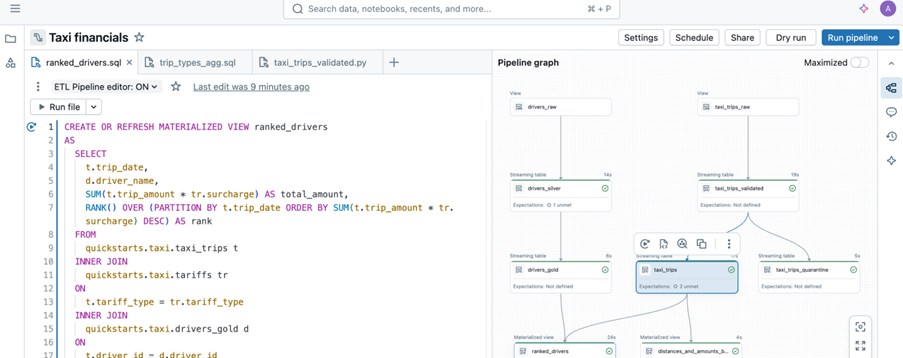
Sample image from databricks documentation.
Lakeflow Spark Declarative Pipelines take ownership of these concerns. Engineers simply declare what needs to be built, and the platform—powered by Databricks—decides how to execute it, including orchestration, state management, and scaling.
This matters because experienced engineers know scalability is critical. With fewer lines of code to maintain, teams focus only on core logic, reduce operational risk, lower data team costs, and rely on the platform to handle execution complexity.
Common Confusion between Delta Live Tables and Delta Tables
- Lakeflow Spark Declarative Pipelines (SDP) is the new name for Delta Live Tables (DLT). And also referred as ETL in databricks world.
- DLT / SDP is a managed data pipeline, not a table
- Delta Tables are an open table format designed for the Lakehouse architecture.
- SDP pipelines are powered by Delta Tables internally. But delta Tables can be used independently without SDP
- SDP focuses on how data is built and managed while Delta Tables focus on how data is stored and accessed
Here it is what SDP covers
- Managed workflow to load into the tables
- Dependency management and orchestration
- Incremental processing
- Integrated data quality
- Simplified SCD handling
- Manage batch and streaming in the pipeline
- Infra management – Cluster, libraries setup, auto scaling
- Optimization
- Operational efficiency – smaller codebase, fewer moving parts, reduced operational risk, reduced custom logic for retries, checkpoints and state management.
- Idempotent, fault-tolerant, and recoverable by design
- built-in monitoring, lineage, and pipeline health tracking
Before diving into the components, refer to my earlier article to get started with SDP—it walks through the basic setup and provides a brief hands-on experience.
SDP components/concepts
- Pipelines
- Flows
- Streaming table
- Materialized views
- Sinks
Pipelines
- A Pipeline is the top-level container, how and where everything runs. It is the unit of development and execution in Lakeflow Spark Declarative Pipelines
- A pipeline contains one or more flows, streaming tables, materialized view and sinks
- It is defined by defining flows, streaming tables, materialized view and sinks source code.
Flows
- A flow lives within a pipeline in Lakeflow Spark Declarative Pipelines.
- A Complete flow reads, transforms and write into a target.
- It supports streaming and batch processing
- Types of flows
- Append
- Auto CDC (change)
- Materialized view
- Typically, flows are defined automatically when you create a query in a pipeline that updates a target, but you can also explicitly define additional flows for more complex processing, such as appending to a single target from multiple sources.
Streaming table
- A streaming table is a managed delta table belongs to Unity Catalog.
- Streaming table has streaming target
- Streaming tables are designed for append-only data sources and process inputs only once. It can have one or more streaming flows (Append, AUTO CDC) written into it.
- Streaming flows can be defined explicitly from streaming target or implicitly by defining streaming table.
- Streaming tables are good choice when,
- Each row handled only once
- Handle large volumes of append only data
- Low latency
Materialized view
- A materialized view is also form of Unity Catalog managed table
- It is a batch target
- It can have one or more materialized view flows written into it.
- Flows defined implicitly as part of materialized view definition
- Like standard view, it is result of query. Unlike standard view it caches results and refresh when pipeline gets triggers.
- Maintain the output table, in sync with source data
- Materialized views are good choice when,
- All required data is processed, even if it arrives late or out of order.
- They are often incremental but not all. Databricks will try to choose the appropriate strategy that minimizes the cost of updating a materialized view.
- Some changes to inputs will require a full computation of materialized view which can be expensive.
Sinks
- A sink is a streaming target for a pipeline.
- It can have one or more streaming flows (Append) written into it.
- A sink does not need to be part of Unity Catalog; it can be external location.
- Example for sinks – azure EventHub & tables (parquet and delta)
- Mostly the use of sinks will be delivering the data to downstream as per contract.
Important points
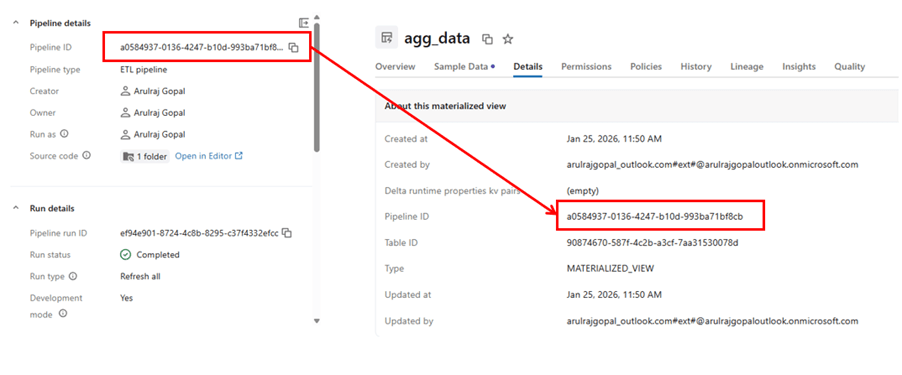
- A table owned by a pipeline can be read by others, but it cannot be written to outside that pipeline. It applies to both streaming table and materialized view.
- Adding or removing a table in the code, will automatically create and deletes the table, after the next run.
- Deleting the pipeline will delete all the tables and views created by the respective SDP’s. Because it owns that.
- Standard views can be created by @pipeline.view while materialized view and streaming table can be created by @pipeline.table
Demo
A sample pipeline which describes every component which explained.
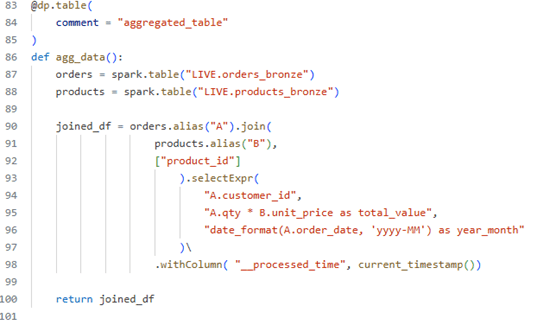
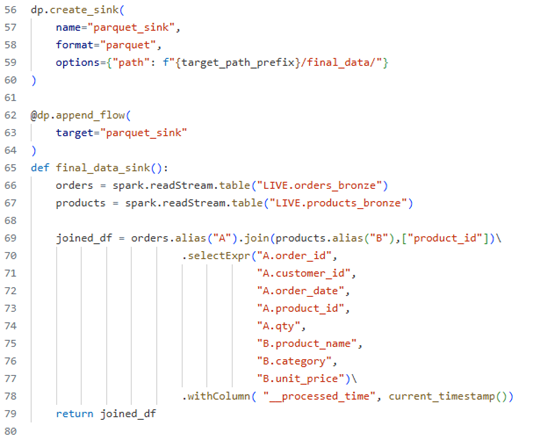
Objective – The pipeline extract data from orders dataset and products dataset and by combining both of data and deliver it sink path and the same data aggregated and kept in materialised view.
Source code – https://github.com/ArulrajGopal/kaninipro/tree/main/databricks_SDP
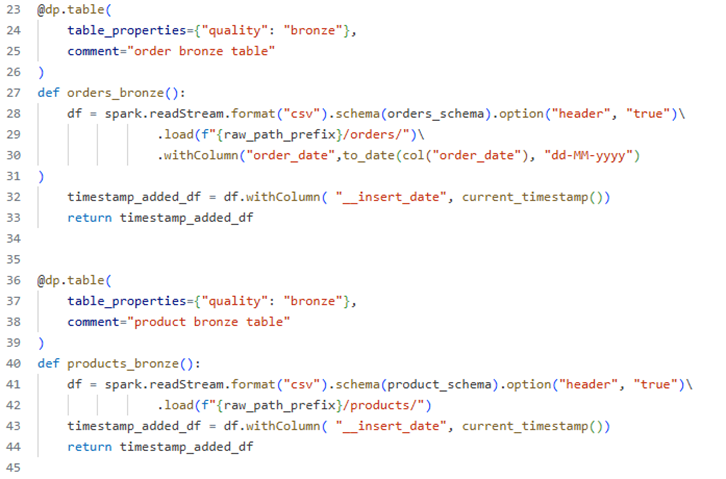
Streaming table definition by using “read Stream”
Materialized view definition – used as aggregated table for insights about data.
Sink definition
Lake-flow declarative pipeline
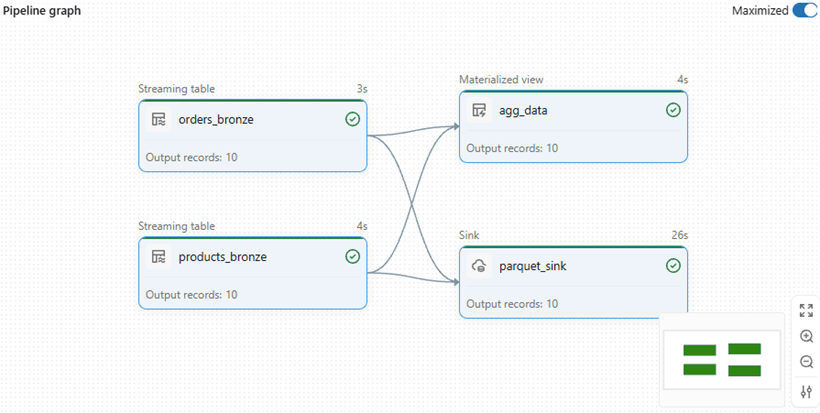
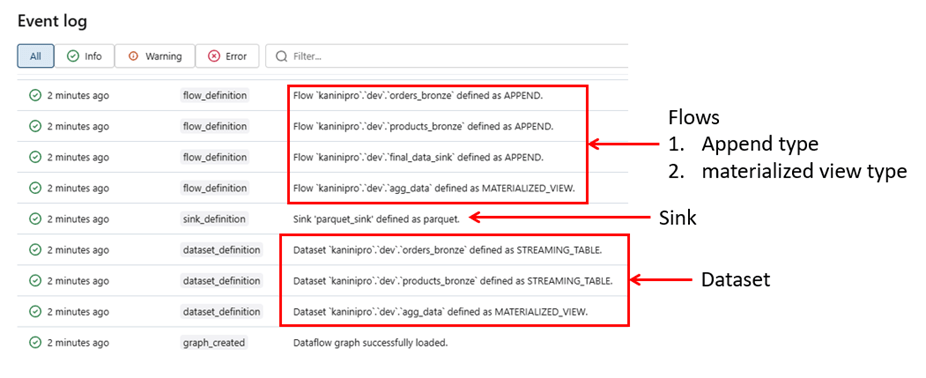
While reviewing the event logs, it becomes clear and understandable the below points.
- 4 flows created, 3 of them is append type and 1 is materialized view type flow
- Datasets – Streaming tables and materialized view created as per code.
- Sink definition and creation
Note: – Change data capture (CDC) type flows are not covered in this article; they are discussed separately, where I elaborate on SCD types and how they can be efficiently implemented using declarative pipelines (see linked article).
Reference for how table is managed by pipeline.
Closing thoughts
Lake-flow Spark Declarative Pipelines simplify building reliable data pipelines by letting engineers focus on what to build rather than how to run it. By abstracting orchestration, scalability, and state management, SDP enables cleaner code, stronger reliability, and faster delivery across batch and streaming workloads.
References
https://learn.microsoft.com/en-us/azure/databricks/data-engineering/procedural-vs-declarative
https://learn.microsoft.com/en-us/azure/databricks/ldp/
https://learn.microsoft.com/en-us/azure/databricks/ldp/concepts
https://spark.apache.org/docs/latest/declarative-pipelines-programming-guide.html
 KaniniPro
Leave a comment