SQL is the most widely used language across data processing applications. For a qualified data engineer, writing efficient queries is a vital skill—but equally important is the ability to write simple, clean, and readable SQL that is easy to maintain over time.
During my exploration of various SQL problems, I found different queries improve readability, performance, and maintainability. In this article, I share these learnings and compare different approaches to solving the same problems, highlighting when and why one approach works better than another.
The goal is not just to make SQL faster, but to make it clearer and more intuitive for anyone who reads or maintains the code in the future.
The following demo is performed in Databricks; however, these options are available in most OLAP databases such as Snowflake, DuckDB, and others.
Count distinct – approximately
Checking the count of distinct values in a column is a very common analysis. In many real-world scenarios, we don’t need the exact number; an approximate value is sufficient to understand data distribution or cardinality. In such cases, using COUNT (DISTINCT …) is often unnecessary and expensive. Instead, approximate distinct functions provide much better performance while delivering results that are accurate enough for most analytical use cases.
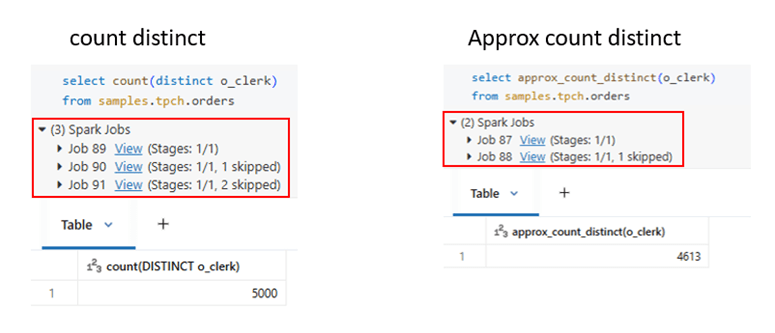
Approx distinct count will make difference, when the data volume is huge.
Group by clause with All
The GROUP BY clause is used to group rows based on one or more columns and to perform aggregate computations on each group.
In SQL dialects that support GROUP BY ALL, adding ALL eliminates the need to explicitly list every non-aggregated column in the GROUP BY clause. It acts as a shorthand notation, automatically grouping by all SELECT-list expressions that do not contain aggregate functions.
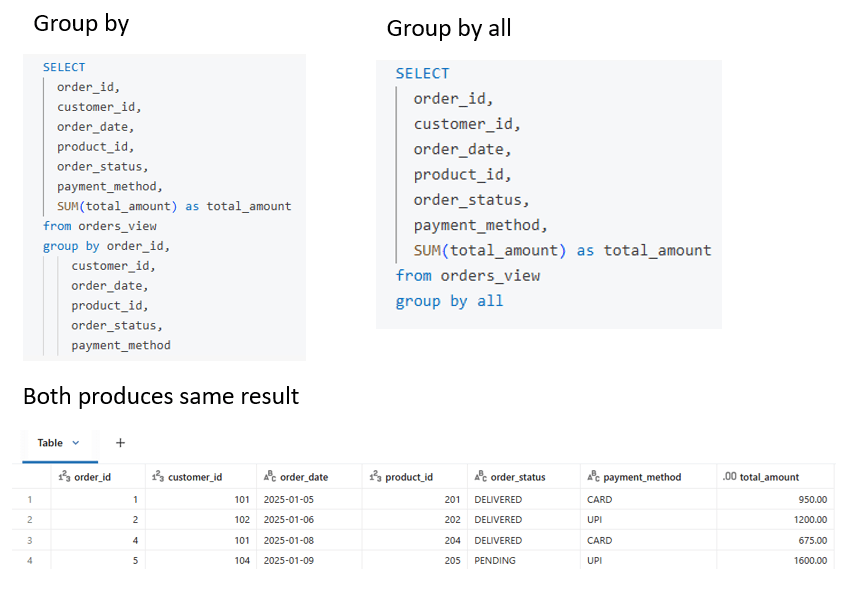
Group by rollup vs cube vs grouping sets
Advanced aggregations which allows multiple aggregation calculations to be performed on the same input dataset in a single query, making analytics both efficient and expressive.
- ROLLUP computes hierarchical totals (detail → subtotal → grand total) based on column order.
- CUBE computes total for all possible combinations of the grouped columns.
- GROUPING SETS lets you explicitly choose which groupings to calculate, avoiding unnecessary aggregates.
Sample dataset
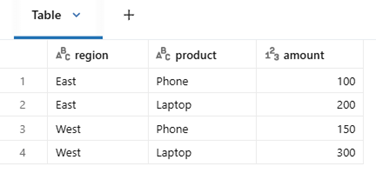
Result Comparison
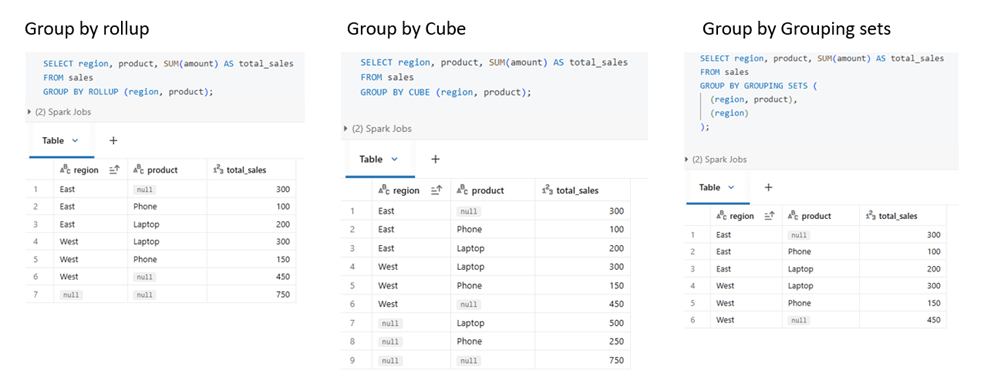
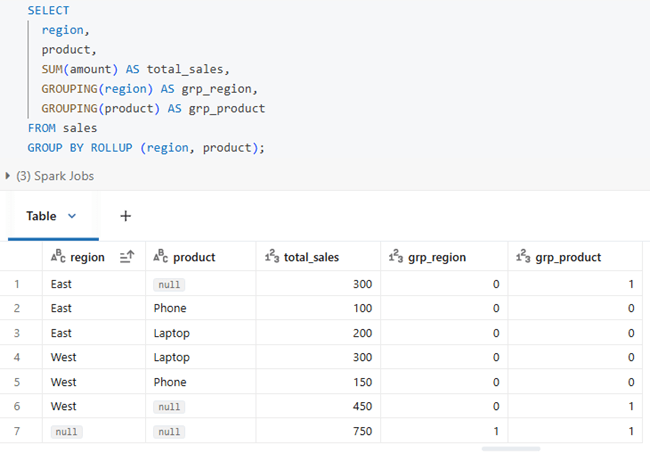
As mentioned, GROUP BY ROLLUP works in a hierarchical manner, GROUP BY CUBE generates all possible aggregation combinations, and GROUPING SETS allows custom-defined groupings with results based on the specified columns.
When all columns from a table are selected, the aggregated rows can look similar to real data rows. To clearly distinguish these grouped rows, the GROUPING keyword is used. It works along with ROLLUP, CUBE, and GROUPING SETS to identify whether a value comes from actual data or from aggregation.
How to read the output:
- 0 → The column contains a real value from the table
- 1 → The column is aggregated (the NULL is generated by ROLLUP/CUBE, not real data)
Max by and Min by
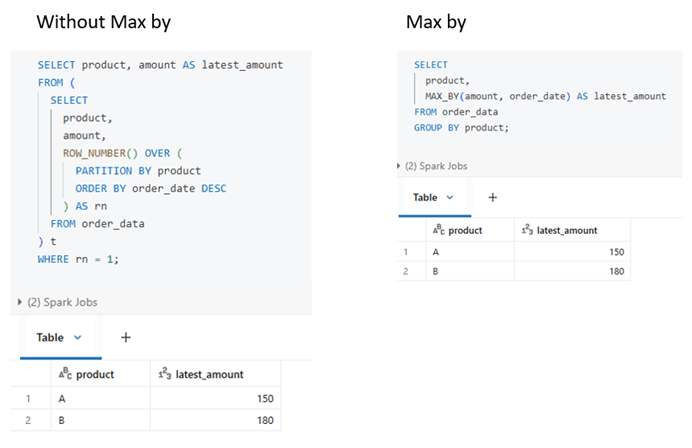
MAX_BY is an aggregate SQL function that returns the value associated with the maximum value of another column.
MAX_BY (value, order_by) returns the value from the row where order_by is maximum. The same way it works for min by.
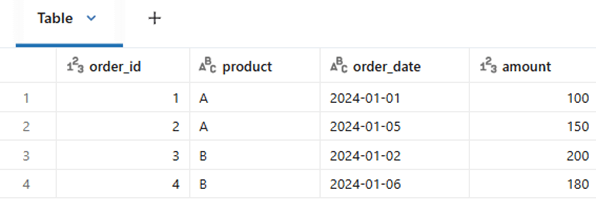
Sample dataset
Qualify clause
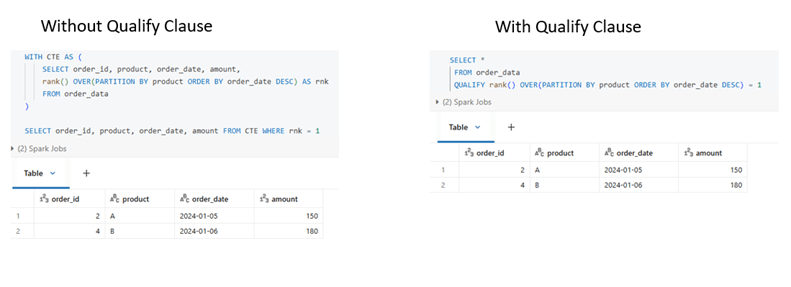
QUALIFY clause is used to filter results after window (analytic) functions are evaluated. Without QUALIFY, the query will be written two parts either using subquery or CTE.
Minus and except
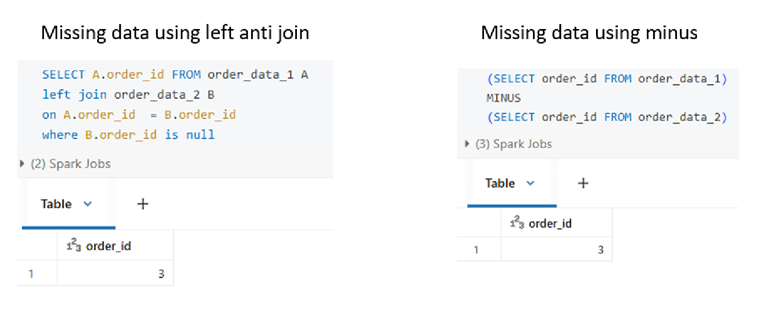
MINUS is a set operation used to return rows from the first query that do not exist in the second query. EXCEPT works the same way and is supported by many SQL engines.
In practice, this logic is often implemented using a LEFT ANTI JOIN, and MINUS/EXCEPT provides alternative for this use case.
Lag and Lead functions
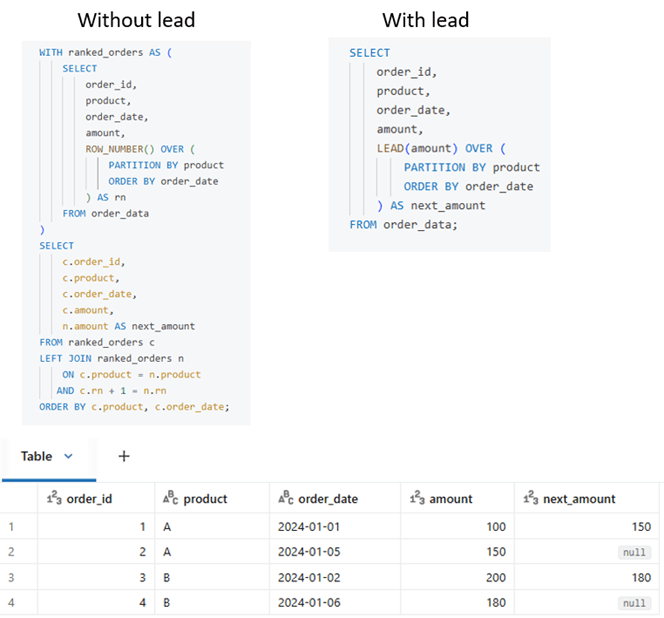
Computing the next or previous value in an ordered dataset is done using LEAD and LAG window functions. Without these, subqueries or self-joins are required, which make the query more complex and less efficient. These functions are mainly useful for calculations like month-over-month or day-over-day differences.
All the queries worked out in this article is attached in this link – Source_code
Conclusion
Modern SQL is not just about performance, but about writing clear, simple, and maintainable queries.
By using features like approximate counts, advanced GROUP BY options, window functions, and QUALIFY, complex logic can be expressed more intuitively and efficiently.
These patterns, available across most OLAP engines, help data engineers reduce complexity while building scalable and future-proof analytics.
 KaniniPro
Leave a comment