Lakeflow Spark Declarative Pipelines is managed a framework for creating batch and streaming data pipelines in SQL and Python.
Why Lakeflow Spark Declarative Pipelines Matter
The core role of a data engineer is to implement business logic to ingest, transform, and serve data in a consumable way. Along with this, engineers must also manage dependencies, incremental processing, data quality rules, and SCD handling—responsibilities that are essential but repetitive.
Lakeflow Spark Declarative Pipelines take ownership of these concerns. Engineers simply declare what needs to be built, and the platform—powered by Databricks—decides how to execute it, including orchestration, state management, and scaling.
This matters because experienced engineers know scalability is critical. With fewer lines of code to maintain, teams focus only on core logic, reduce operational risk, lower data team costs, and rely on the platform to handle execution complexity.
Common Confusion between Delta Live Tables and Delta Tables
- Lakeflow Spark Declarative Pipelines (SDP) is the new name for Delta Live Tables (DLT). And also referred as ETL in databricks world.
- DLT / SDP is a managed data pipeline, not a table
- Delta Tables are an open table format designed for the Lakehouse architecture.
- SDP pipelines are powered by Delta Tables internally. But delta Tables can be used independently without SDP
- SDP focuses on how data is built and managed while Delta Tables focus on how data is stored and accessed
Here it is what SDP covers
- Managed workflow to load into the tables
- Dependency management and orchestration
- Incremental processing
- Integrated data quality
- Simplified SCD handling
- Manage batch and streaming in the pipeline
- Infra management – Cluster, libraries setup, auto scaling
- Optimization
- Operational efficiency – smaller codebase, fewer moving parts, reduced operational risk, reduced custom logic for retries, checkpoints and state management.
- Idempotent, fault-tolerant, and recoverable by design
- built-in monitoring, lineage, and pipeline health tracking
SDP important components
Pipelines –
- A pipeline is meant for a Lakeflow spark declarative pipelines. In others words a pipeline is a definition of one SDP along with source code.
- It can contain many flows, streaming tables, materialized views and sinks
- Once the pipeline is defined with code, it analyses and decides what to do with it is own efficient plan.
Streaming table –
- A streaming table is a form of Unity Catalog managed table that is also a streaming target for Lakeflow SDP.
- A streaming table can have one or more streaming flows (Append, AUTO CDC) written into it.
- Streaming tables are designed for append-only data sources and process inputs only once.
Materialized view –
- A materialized view is also a form of Unity Catalog managed table and is a batch target.
- It is results of query & a flow to update it.
- Unlike standard views it caches the results and refreshes so queries against it much faster than regular views.
- Tracks changes in upstream data. On trigger, incrementally processes the changed data and applies the necessary transformations.
- All required data is processed, even if it arrives late or out of order.
- They are often incremental but not all. Databricks will try to choose the appropriate strategy that minimizes the cost of updating a materialized view.
- Some changes to inputs will require a full computation of materialized view which can be expensive.
- They are not designed for low-latency use cases.
Sinks –
- A sink is a streaming target for a pipeline.
- It can have one or more streaming flows (Append) written into it.
Important points
- A table owned by a pipeline can be read by others, but it cannot be written to outside that pipeline. It applies to both streaming table and materialized view.
- Adding or removing a table in the code, will automatically create and deletes the table, after the next run.
- Deleting the pipeline will delete all the tables and views created by the respective SDP’s. Because it owns that.
- Standard views can be created by @pipeline.view while materialized view and streaming table can be created by @pipeline.table
Getting started with spark declarative pipeline in databricks
Prerequisite –
- Databricks workspace with premium plan & unity catalog enabled. Refer my other article Azure Databricks setup with unitycatalog
- Databricks CLI is installed and authenticated on the base machine;
- Setup the initial code base with databricks bundle, so that it can be deployed through databricks asset bundles and version control can be done through CI/CD. Refer the article to get familiar with bundle initialize and setting up initial code base – Deploying Lakeflow Jobs with Databricks Asset Bundles
Execution –
Resources spin up
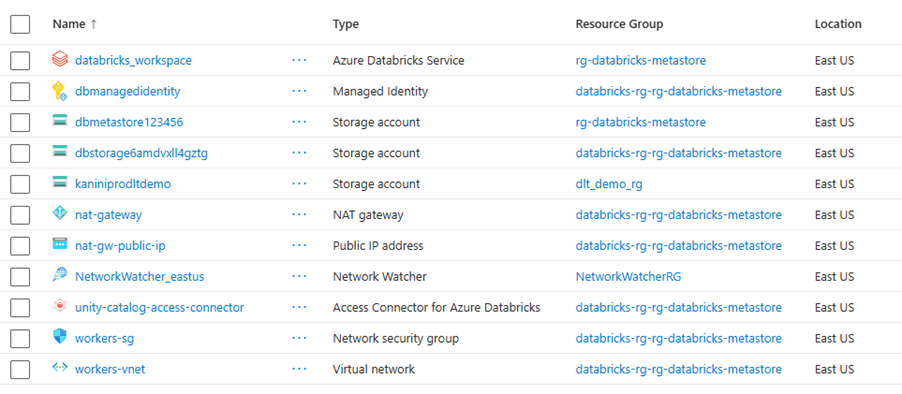
Databricks CLI authentication

Source code for basic SDP
https://github.com/ArulrajGopal/kaninipro/tree/main/databricks_SDP_startup
Fully developed and deployed pipeline after first run.
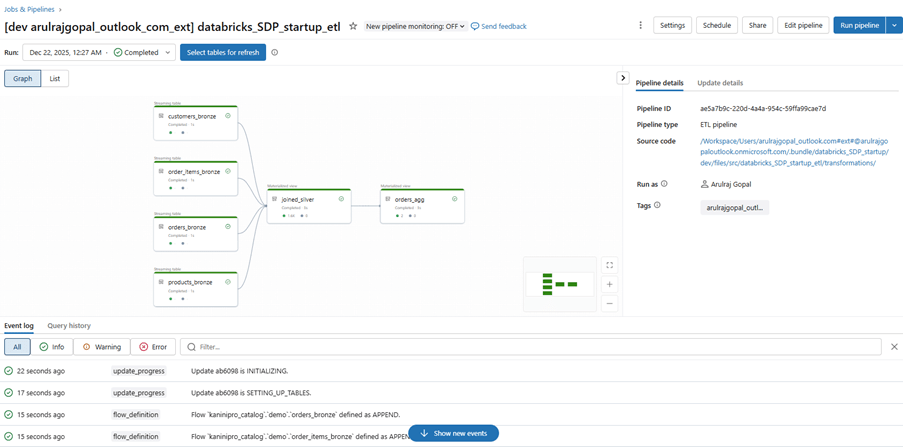
After processing, pipeline graph.

Final output in the materialized view.

Reference for how tables/views are managed by pipeline.

Closing thoughts
Lakeflow Spark Declarative Pipelines shift data engineering from managing pipelines to declaring intent. By offloading orchestration, scalability, and reliability to the platform, teams can focus on what truly matters—building accurate, maintainable, and business-driven data products.
References
https://learn.microsoft.com/en-us/azure/databricks/ldp/
https://spark.apache.org/docs/latest/declarative-pipelines-programming-guide.html
Leave a comment