Data governance is one of the most integral parts of any data project, and data lineage plays a key role in understanding and tracking the true source of data.
What is data lineage?
Data lineage provides end-to-end visibility of how data moves across systems—from its origin, through every transformation, to its final usage. It helps teams see where data came from, how it was modified, and which downstream reports or applications rely on it.
A system is considered to have strong lineage when it is automated, accurate, up to date, and provides clear upstream and downstream impact analysis at both table and column levels.
Databricks Unity Catalog delivers this capability with built-in lineage tracking that can be explored through the UI or accessed programmatically. This article will demonstrate how these features strengthen overall data governance.
Let’s demo how the lineage can be tracked in databricks notebooks.
Below is the script (in notebook) used to extract data from sales dataset and aggregate to get the most valuable customer for every year-month. The Aggregated data kept in gold layer in the table “higest_order_vaule_cust” and the column is “total_order_value_sum”.
After processing just checking the catalog and tables.

Opening the gold layer table and checking the lineage through UI.

Below is the lineage graph which covers end to end data lineage of the column “total_order_value_sum” is derived from different tables.
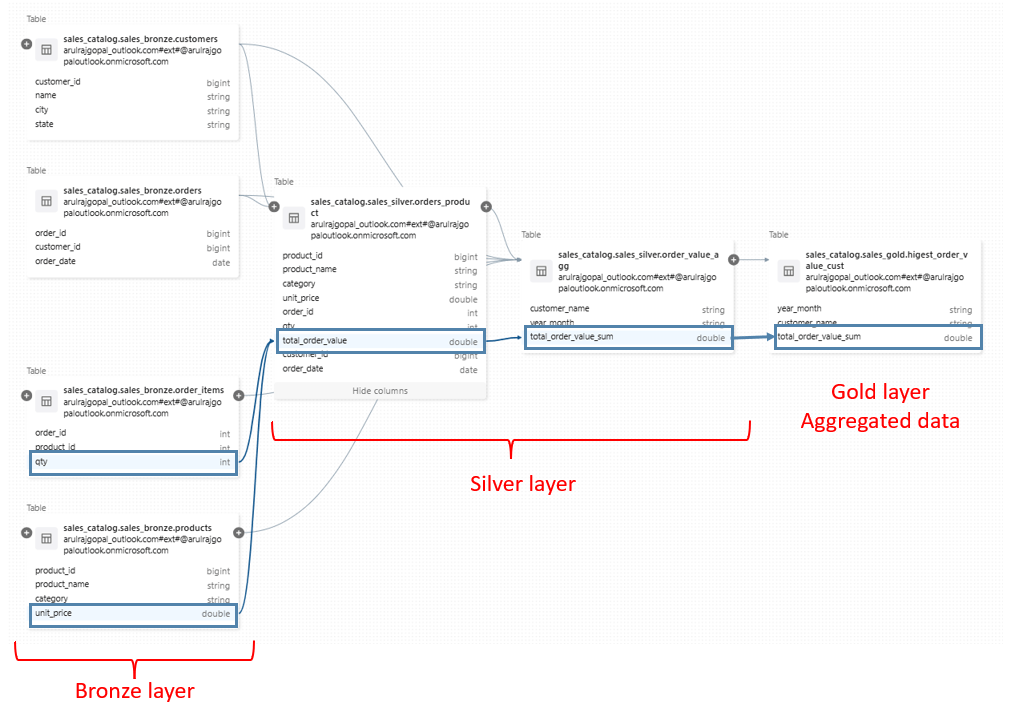
It looks easy to track lineage, but when it comes to large number of fields, instead of UI querying it in table will be much simpler.
Databricks provides system tables that help track data lineage across your data platform. These system tables capture how data flows between sources and targets, making them a key part of data governance and observability.
To access lineage information, the workspace must be Unity Catalog enabled, and the tables must be processed using job clusters. Only then is lineage metadata recorded and made available in the system tables.
Databricks supports two levels of lineage tracking:
- Table lineage – shows how tables are related and how data moves between them.
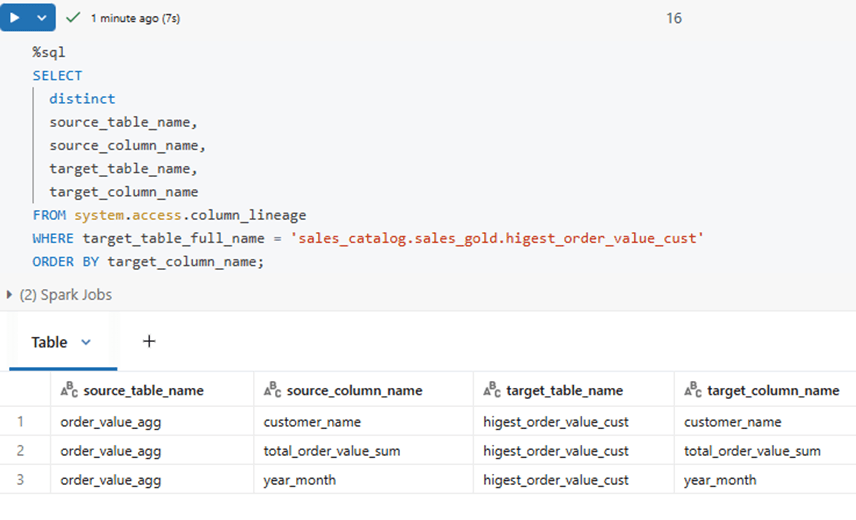
- Column lineage – provides fine-grained visibility into how individual columns are derived and transformed.
Together, these system tables enable end-to-end visibility into data movement, helping teams understand dependencies, assess impact, and maintain trustworthy data pipelines.
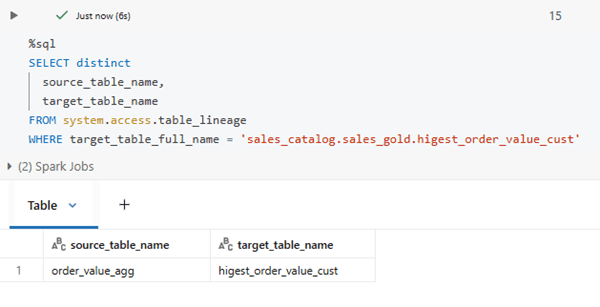
Below is the query & result for table lineage.
Below is the query & result for column lineage.
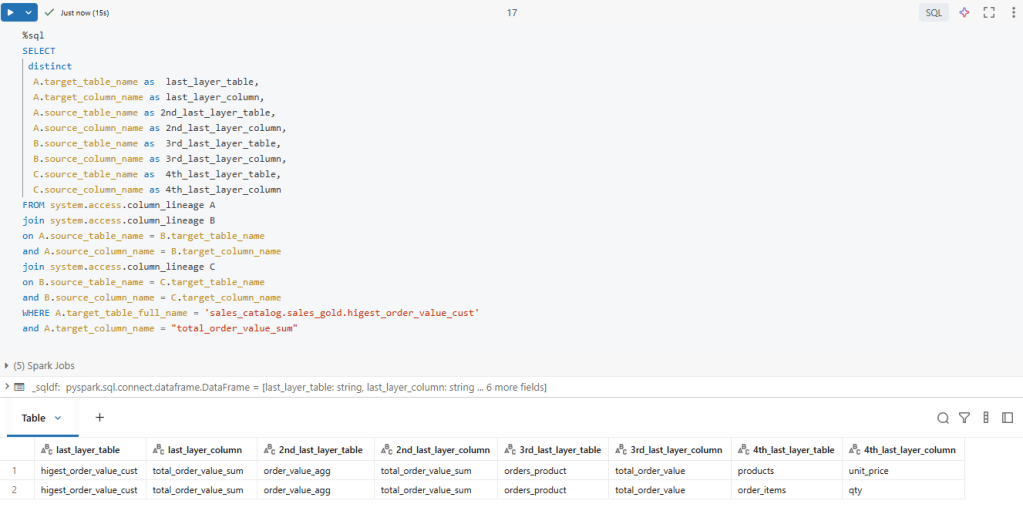
Below is the SQL query that retrieves the complete end-to-end lineage of the total_order_value column, tracing it all the way back to its original source using Databricks system tables.
This approach enables programmatic and auditable lineage analysis purely through SQL, offering deeper flexibility and analytical power compared to exploring lineage only through the UI. It is especially useful for engineers and governance teams who want to query, validate, and automate lineage insights at scale.
Note:
- To get system tables update usually takes 24-48 hours.
- It will applicable only if the notebook run through job and job cluster
- Unity catalog enable is must, then only system table will be available.
Conclusion
Databricks Unity Catalog enables automated, end-to-end table and column lineage through UI and system tables, making large-scale data governance transparent, scalable, and trustworthy.
References
https://learn.microsoft.com/en-us/azure/databricks/data-governance/unity-catalog/data-lineage
 KaniniPro
Leave a comment