When working with large-scale data in a lakehouse architecture, performance matters — a lot. One of the most effective ways to boost query performance is through a concept called data skipping.
In simple terms, data skipping helps the query engine avoid scanning unnecessary data. Instead of reading every record, it intelligently skips over chunks of data that aren’t relevant to your query.
This principle mainly revolves around two core techniques: Partitioning and Clustering.
Partitioning: Organizing Data into Folders
Partitioning divides your dataset into multiple physical files or directories based on the values of a specific column — typically one with low cardinality (i.e., fewer unique values).
For example, if your data has a column like region or year, partitioning by that column ensures all related records are stored together.
So, when you query data for a specific region or year, the engine only looks inside the relevant partitions — not the entire dataset.
Clustering: Structuring Data Within Files
Clustering, on the other hand, organizes data inside those files based on certain column values.
It’s most effective for high-cardinality columns — like customer_id or transaction_id — where partitioning would create too many small folders.
With clustering, related values are grouped together in the same file or block. When a query runs, the engine uses file-level statistics (like min and max values in Parquet files) to decide which files or row groups to skip.
Databricks generally suggests avoiding partitioning unless your dataset size exceeds 1 TB.
Partitioning and Clustering are the twin pillars of data skipping in modern data lakes.
In my previous article on Hive Partitioning, I covered data partitioning and benefits of that.
In this follow-up, we’ll shift our focus to the next pillar of performance optimization in the lakehouse — Clustering — and explore its different options, use cases, and advantages in detail.
What are the different Clustering options?
Here are the different clustering options available in Spark and Databricks:
- Z-Order By
- Liquid Clustering
- Liquid Clustering with AUTO keys
- Ingestion Time Clustering
- Bucketing – Spark
Z Order BY
Z-Order By is a data optimization technique in Delta Lake that improves query performance by co-locating related data on disk. It organizes data files based on the values of multiple columns using a multi-dimensional ordering algorithm known as the Z-order curve (or space-filling curve).
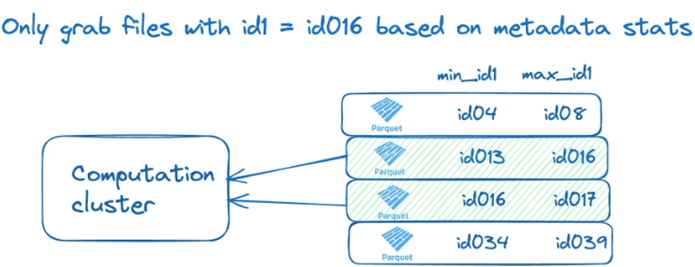
This method helps the query engine quickly skip over irrelevant data files — a concept known as data skipping — resulting in faster reads, especially for filter and range queries on large datasets.
When you apply Z-Ordering, Delta Lake physically rearranges data within files so that rows with similar column values are stored close together. This greatly reduces I/O during queries that filter on those columns.
To make this possible, Delta tables store min/max values for columns in each file. Let’s visualize how the min/max statistics stored for the id1 column can be used to perform file skipping.
Z-Ordering is particularly useful for columns that are Frequently used in WHERE or JOIN conditions and highly selective or used together in queries
Code for implementation

Liquid Clustering
Liquid Clustering takes Z-Ordering to the next level — it’s dynamic, incremental, and metadata-driven. Instead of sorting all data at once, it continuously tracks and reorganizes data as it’s written. It eliminates the need for heavy OPTIMIZE jobs, offering always up-to-date clustering.
You enable it simply with:
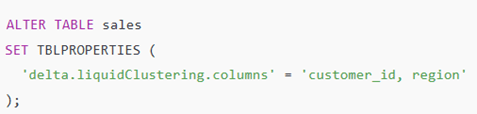
Then, Delta Lake automatically handles the rest — organizing and re-clustering data efficiently over time.
Liquid clustering is incremental, meaning that data is only rewritten as necessary to accommodate data that needs to be clustered. Data files with clustering keys that do not match the data to be clustered are not rewritten.
Databricks runtime 16.0 provides option to forced trigger for clustering.

Liquid Clustering with AUTO keys
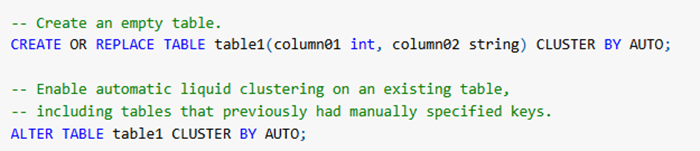
In Databricks Runtime 15.4 LTS and above, you can enable automatic liquid clustering for Unity Catalog managed Delta tables.
Automatic Liquid Clustering is a variant of the liquid clustering technique (sometimes just “liquid clustering”) in Delta Lake / Databricks, where the system itself autos-selects and evolves clustering keys (and layout) over time, rather than requiring you to manually pick clustering columns.
In other words:
- You enable clustering with CLUSTER BY AUTO (or equivalent).
- The system monitors query/usage patterns and suggests or internally chooses good columns to cluster by.
- Over time, as data and query patterns change, the system adjusts the layout to keep things efficient.
So it’s the “set it and forget it (more or less)” mode of clustering — compared to manual clustering where you pick the columns.

SQL
Ingestion time clustering
Ingestion-time clustering is a data-layout optimisation strategy where the table’s physical file layout is implicitly organised according to the time when data was ingested (written) into the table.
When your table is dominated by continuous ingestion and recent-time queries, you don’t always need aggressive partitioning or manual clustering. By relying on ingestion-time clustering, you let the system implicitly group data by write order/ingest time and take advantage of file-level statistics for data skipping.
As part of ingestion time clustering, the other manipulation and maintenance commands, like DELETE, UPDATE, and OPTIMIZE, also preserved the ingestion order to provide consistent and significant performance gains.

Bucketing
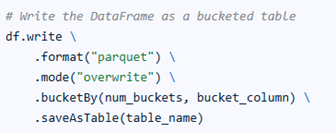
Bucketing in Spark is a technique used to optimize data processing by dividing large datasets into a fixed number of evenly distributed buckets based on the hash value of a column.
This helps improve the efficiency of joins, aggregations, and sampling by ensuring related data is stored together, reducing shuffle operations during query execution.
Each bucket is stored as a separate file, and the number of buckets is defined during table creation.
Bucketing is a Spark feature, not tied to Delta Lake, making it especially useful for Parquet tables where Z-Order By (a Delta Lake feature) isn’t available.
Conclusion
Partitioning and Clustering are the core techniques that enable effective data skipping and high-performance querying in lakehouse architectures.
While partitioning helps prune entire folders, clustering optimizes data placement inside files to further reduce scans.
Choosing the right clustering strategy — Z-Order, Liquid, AUTO, Ingestion-time, or Bucketing — depends on your data scale, query patterns, and operational needs.
References
Vu Trinh article about partitioning and clustering
Databricks blog ingestion time clustering
 KaniniPro
Leave a comment