
In the big data world, data lakes brought several advantages—they are scalable, cost-efficient and flexible enough to store data in any format like unstructured and semi structured. However, data-lakes lack the warehouse-like capabilities needed for ACID, performance, and structured analytics.
This is where Delta Lake (lake house architecture) comes in. Originally developed by Databricks and later open-sourced, Delta Lake combines the best of both worlds: the flexibility of a data lake and the reliability of a data warehouse.
Delta Lake is more than just storage which built on top of data lake with its capabilities.
Key features of Delta Lake:
- Supports UPDATE, DELETE in CRUD operations, where as in data-lake only data will be added and retrieved.
- Enabled ACID transactions
- Supports schema enforcement (rejects bad data)
- Supports schema evolution (allows safe addition of new columns).
- Time travel & data versioning with restore capability
- Deletion vector – used to track deleted rows without physically rewriting the underlying data files immediately.
- Provides operation history (who wrote what, when), making governance and compliance easier.
- Like data lake, it also uses cloud object storage, so cost efficient in terms of storage.
How it works
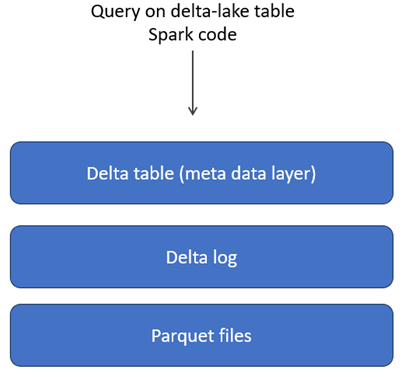
Delta Lake uses the same cloud storage as a data lake, where the actual data is stored as objects (such as Parquet files) along with transaction logs (known as the Delta Log). On top of this, a metadata layer is present. When you run a query, it first interacts with the metadata layer, which uses both the Delta Log and the Parquet files to return accurate and consistent results.
Let’s try some operations on a Delta table to see how it works, exploring features like time travel and data versioning. There is still a lot more to uncover in Delta tables—such as how ACID is enabled—which I’ll cover in upcoming articles.
Note: For this demo, the deletion vector feature is disabled. In Delta Lake 2.0 and later, deletion vectors are used to handle row-level deletes and updates efficiently, without the need to rewrite entire Parquet files.
Table creation using DDL

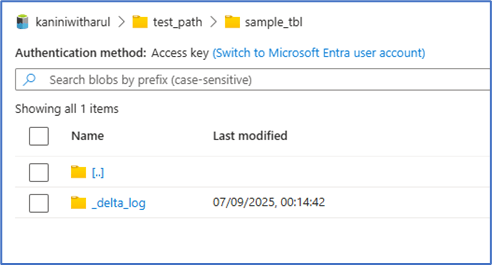
The table created with delta log. Note, there is no file object because the table only created.
Below is the code to insert some records at first time.

After the inserts, new Parquet file added and the Delta log is updated accordingly.
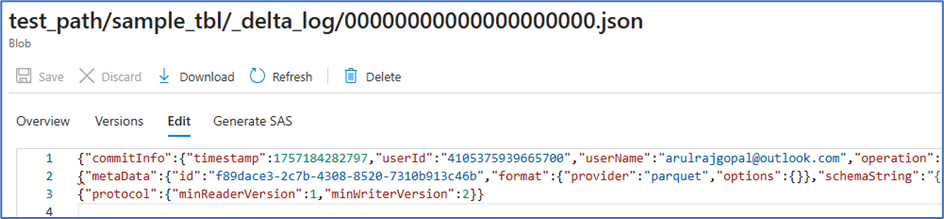
First Json doesn’t have anything (it contains some table properties) because only table is created at that point of time. While looking at the second JSON entry, it is clear that the log indicates a new Parquet file was added. This means that when reading the table, the Delta Lake engine will also read this Parquet file.


Next, let’s perform three operations: insert a record, update a record, and delete a record.
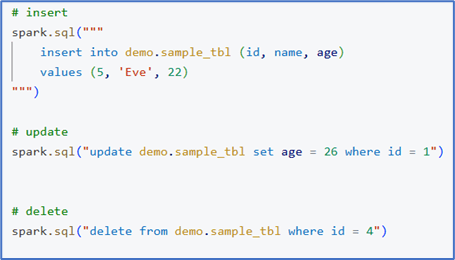
With each transaction, a new Parquet file is added. Ideally, the number of Parquet files should match the number of Spark partitions. Since we are processing only a single record in this step, just one parquet file is created for each transaction.
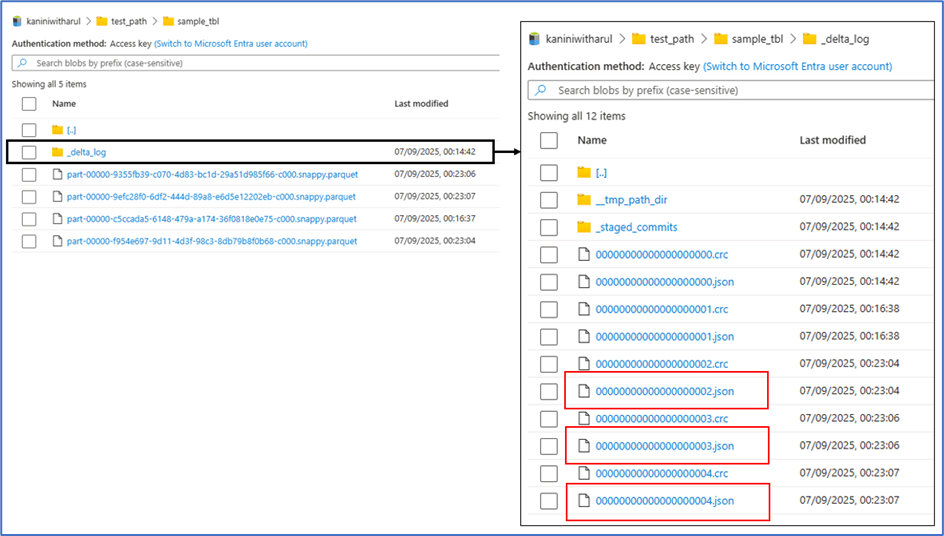
At the same time, each transaction also generates a JSON log entry, which keeps track of how the data should be read. Let’s explore this further.
For the sake of this demo, I’ve placed all these JSON entries into single sheet to make the explanation easier.
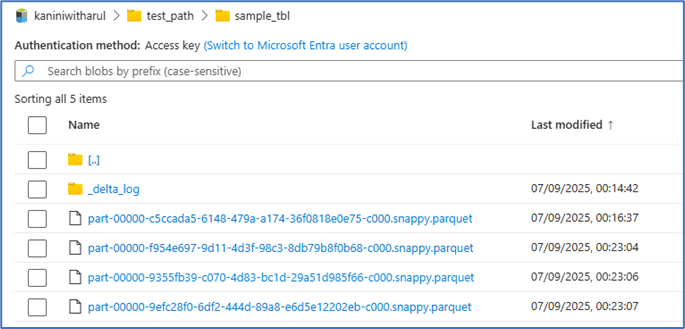

Here’s the explanation:
- The 0th JSON file corresponds to the table creation.
- The 1st and 2nd JSON files capture simple inserts, each marked with an “add” indicator and pointing to a new Parquet file. This means that with every insert transaction, the newly added records are written into fresh Parquet files.
Things get more interesting when we look at the update operation. Since Parquet files are immutable, the update is handled in two steps:
- The JSON log marks the old parquet file as REMOVE where the record stays originally.
- The updated record along with other records (but in this demo nothing) is written into a new Parquet file with an ADD indicator.
As a result, when we read the Delta table at this point in time, the Delta engine consolidates all the changes—ignoring the Parquet files flagged with REMOVE and returning only the active records.
This means that while the old data still physically exists in cloud object storage, the Delta engine ensures that it’s logically invisible during queries. It also enables powerful features like time travel. and you can restore previous version if it is required.
The next transaction we performed was a delete. Here too, we can notice the same pattern of ADD and REMOVE entries. Since Parquet files are immutable, deleting a record means the entire Parquet file is rewritten without that record and marked with an ADD indicator, while the old file is flagged with a REMOVE indicator.
This mechanism ensures that deletes are tracked in a reliable, consistent way.
The DESCRIBE HISTORY command helps us view the version history of a Delta table, including details about who performed the operation, what action was taken, and when it happened.
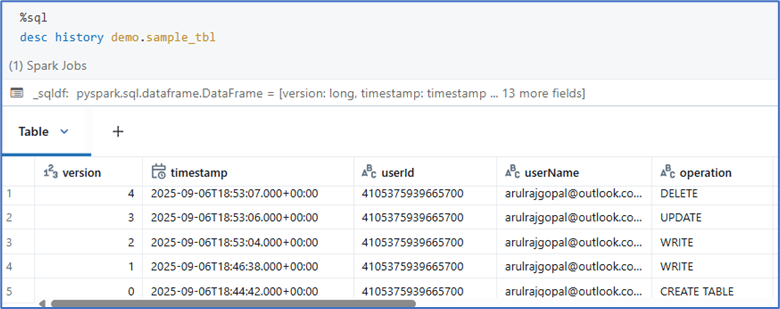
Time travel in Delta Lake can be achieved by querying a table using either a specific version number or a timestamp.

An obvious question might arise: what happens if there are an enormous number of transactions? Wouldn’t the Delta Log become too large and hurt performance?
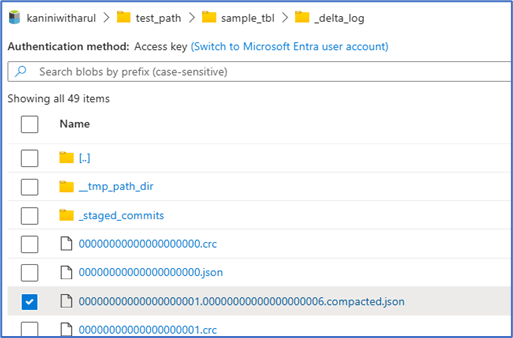
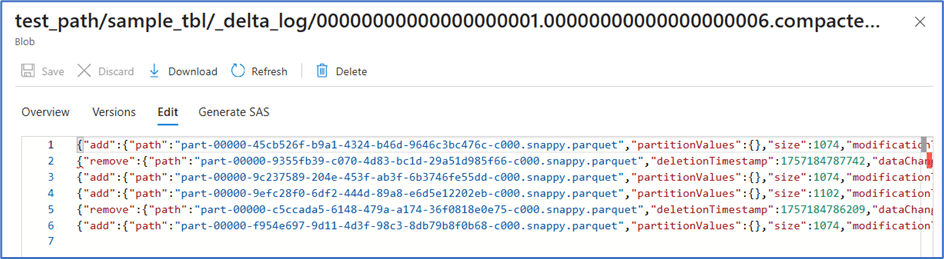
That’s exactly where compaction comes in (in earlier versions of Delta Lake, this was referred to as a checkpoint). By default, after every 6 transactions, Delta Lake creates a compacted JSON file. This file is a consolidated snapshot that summarizes the state of the Delta table up to that point by combining the information from the previous 6 JSON log files.
When the 7th transaction occurs, the Delta engine doesn’t need to scan all 6 earlier JSON files. Instead, it simply reads the first compacted JSON file along with the 7th JSON file. This way, no matter how many transactions are performed, the engine only needs to process a limited set of files, keeping performance stable.
Below is a sample of how a compacted file is created
Conclusion
Delta Lake bridges the gap between data lakes and data warehouses by combining scalability with reliability through ACID compliance, schema enforcement, and versioning.
Its smart design of immutable Parquet files with Delta Logs ensures consistent queries, time travel, and efficient updates/deletes. Ultimately, Delta Lake transforms a simple data lake into a powerful lakehouse, enabling both flexibility and structured analytics.
 KaniniPro
Leave a comment